Onboarding Wizard
Guide buyers from checkout to delivery setup
Ask buyers where they want leads, how many they want each day, and how they want to receive them. Your team can see any API or call setup that still needs work.
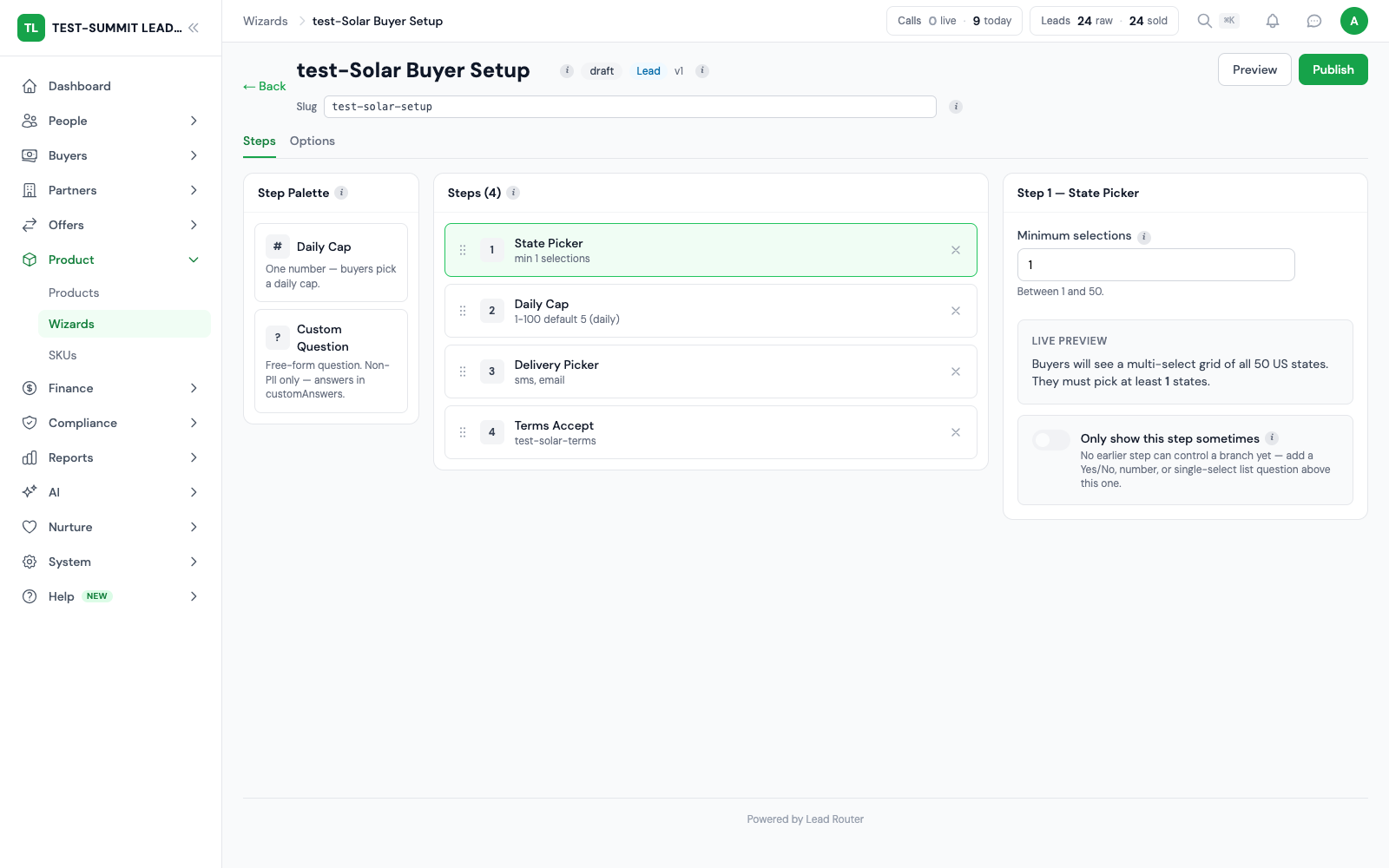
How it works
- 1
Choose the setup steps
Attach a wizard to the product and pick the steps it supports. The product gives each buyer a starting set of choices. Add questions for any extra details your team needs.
- 2
Let the buyer respond
Choose which steps buyers see. They can pick states, set a daily cap, choose delivery and accept terms. Your team can check their progress without asking for each answer by email.
- 3
Finish delivery setup
Apply the buyer’s answers and finish any open setup. If they choose an API webhook, your team still needs to set up the connection. Call products may need more call setup before they can go live.
The buyer experience
A focused question at each step
- Only the steps you include
- The buyer follows the flow you built and can see their progress.
- Answers remain connected
- State targeting, daily cap and delivery choices stay with the buyer’s setup.

See the buyer’s side
From questions to a clear next step
Watch a buyer choose states, set a daily cap and pick delivery in a real setup flow.
You define the setup
You attach the supported steps to the product’s wizard.
The buyer supplies the answers
A setup link opens the steps for the product the buyer bought.
Your team finishes the setup
API delivery still needs integration work. Funding, contract state and any pending call setup still apply.

Read the video transcript
- 0–12 seconds: A fictional buyer workspace shows the available lead products. This demonstration does not place an order or charge a card.
- 12–26 seconds: The buyer opens a prepared setup flow and selects the states where they want to buy leads.
- 26–38 seconds: The daily-cap step collects the buyer’s volume limit.
- 38–50 seconds: The buyer selects delivery. An API webhook choice needs the operator to set up the integration.
- 50–60 seconds: The buyer reviews the terms. The recording stops before activation or notifications. Operator integration work and final checks still apply.
What buyers can set up
Choose the steps your buyers need from the options below.
State selection and daily caps
Choose states and set a daily lead limit as a whole number. Set other filters, schedules and weekly or monthly limits on the contract.
Delivery choice and team setup
Ask buyers how they want to receive leads or calls. If they pick API webhook, your team gets a notice to finish the setup. Field mapping, response rules and live delivery tests happen in the admin integration tools.
Questions and terms
Add custom questions and a terms step to collect product-specific details. These steps gather answers only. Integration setup stays in the admin tools.
Before delivery starts
Finishing the questions is one part of going live. Your team must also check call setup, contract status, funds and routing rules. Show the next step if a buyer cannot receive leads or calls yet.
What your account needs
Your team sets up the product and wizard. An admin must set up API delivery. Call products need call setup too. Buyers need a valid setup link for the product they bought.
Frequently asked questions
What can buyers configure themselves?
Buyers can pick states, set a daily lead limit, choose delivery, answer questions and accept terms. You choose which steps they see. Daily limits use whole numbers. The product sets the starting choices.
Can buyers build a webhook or CRM integration inside the wizard?
No. The wizard only collects the delivery choice. Picking API webhook sends a setup request to the operator. Administrators build and test the endpoint, field mapping and response rules in the delivery tools.
Does completing the wizard always start delivery?
No. The wizard saves the buyer's answers. Your team may still need to set up calls. The contract must be ready, with funds, open hours and room for more leads or calls.
Can buyers resume setup?
Yes. Buyers reopen their setup link to return to the wizard. Operators can see how far they got and help finish any open steps.
Explore the platform
Set up your buyer network
Choose how buyers get leads and calls. Keep their setup and routing rules in one place.
Every feature is part of the plan. Usage is billed in credits.