White-Label and Multi-Brand Operations
Your domain, your logo, your Stripe. Run buyer and partner portals on a custom domain under your brand, take payment through your own Stripe Connect account, and keep every tenant isolated at the row level on every tenant-scoped table.
Per tenant
Custom domains
Your brand
Logo
Your Stripe
Payments
Row-level
Tenant isolation
The Basics
Your brand on every portal
White-label means your buyers and partners see your domain, your logo, and your company on the invoice.
When you run a lead operation, your buyers and partners should deal with your business. White-label puts your domain and logo on the portals they log into and processes their payments through your own Stripe account, so the relationship stays yours.
Underneath, the routing engine, contracts, caps, reporting, and every other module run the same way. White-label changes who the customer sees and who gets paid. It sits on top of a platform that keeps each tenant’s data separate from every other tenant’s.
What you control
Three things that make it yours
You control the parts a buyer or partner notices.
Custom domain
Point a custom domain at your tenant and your buyers and partners reach the portals at your address. They log in, submit, and check their numbers on your domain, not a shared platform URL.
Custom logo
Upload your logo, and it shows on the portals your buyers and partners use. The people you work with see your brand where they spend their time.
Your Stripe Connect
Buyer checkout pages belong to your tenant and carry your brand. Your company processes payment through your own Stripe Connect account. The checkout notice reads “Payment is processed by your company.”
How It Is Built
Multi-brand on real isolation
Running more than one brand only works if the tenants behind them cannot see each other's data.
Row-level tenant isolation on every tenant-scoped table
Every tenant-scoped table carries a tenant ID, and queries are limited so one tenant’s rows never show in another tenant’s view. Multiple brands run on the same platform without leaking into one another.
Branded portals for every role
Admin, buyer, and partner portals all run under your brand. The people on each side of your business log into your domain and see your logo, whichever role they hold.
Tenant-branded checkout
Checkout pages belong to the tenant and carry that tenant’s brand. Payment goes through that tenant’s own Stripe Connect account. Each brand collects on its own account, not a shared one.
Per-tenant feature toggles
Each tenant can turn features on or off on its own, so brands can offer different things without separate installs.
Who Runs It This Way
When white-label matters
A few kinds of business where your brand matters as much as the routing engine.
Agencies that run lead distribution for clients want each client to see the agency’s brand. Custom domains, your logo, and your Stripe keep the agency at the center of the relationship.
Operators who run more than one brand want each brand to look and bill like its own company. Row-level isolation on every tenant-scoped table and per-tenant feature toggles let multiple brands share the same platform while keeping their data and settings separate.
In every case, the same routing engine, contracts, caps, and reporting run underneath. White-label changes the domain your buyers reach, the logo they see, and the account that collects their payment. It does not change how leads route.
Make the workspace yours and control who sees it
Branding and access settings serve different parts of the customer experience.

Colors, favicon, and sign-in
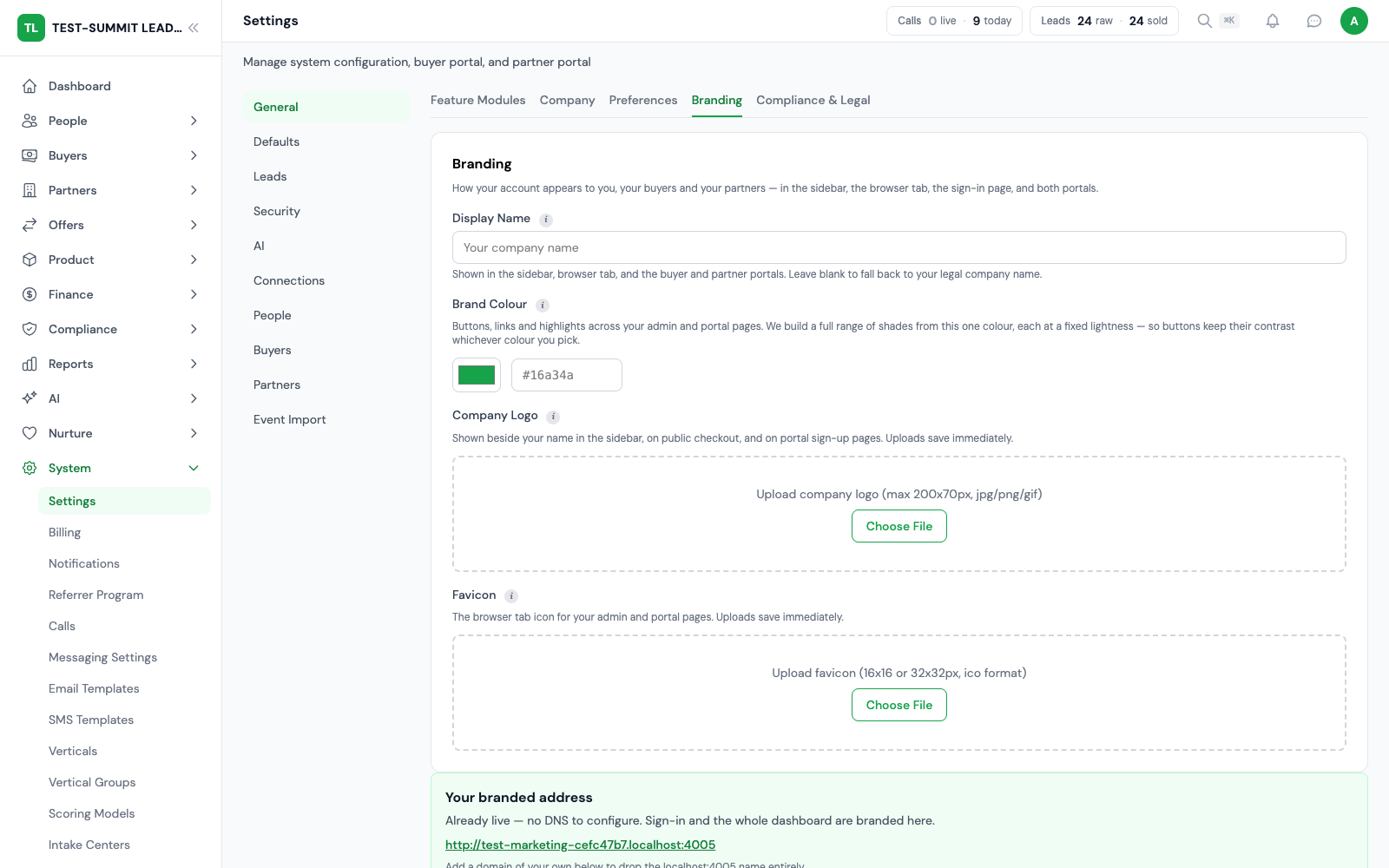
Set the supported brand colors, logos, favicons, social share image and sign-in screen along with your domain. Preview each screen so browser tabs, shared links, checkout entry points and portal pages show the brand you intend.
Brand import and review
Supported branding import can give you a starting point. Review imported assets and colors before you apply them. Imported suggestions do not replace an operator’s brand approval.
Role menus and dark mode
Portal menus and supported appearance settings, including dark mode, shape the workspace for each role. Turning on a module does not by itself give every user access to its data or actions.
Passkeys, 2FA and sessions
Account security supports passkeys, two-factor rules by role, and session review and revocation. Set the policy for the roles that need it, and revoke sessions when access changes.
Permissions and dependencies
Some feature modules need other modules or provider connections. Team permissions separately control PII (personal data), exports and admin actions. To confirm what a role can see, check it from that role’s own workspace.
Help in context
Global help search and supported in-product help give users instructions, so they do not have to guess setup from menu labels. Send unresolved account setup issues through the support workflow.
Frequently Asked
FAQ
What operators ask before putting their brand on the platform.
What does white-label actually cover?
Your domain, your logo, and your Stripe. Buyers and partners reach the portals on a custom domain, see your uploaded logo, and pay through your own Stripe Connect account with checkout branded to your company. The routing engine and every other module run the same underneath.
Can I use my own domain?
Yes. You point a custom domain at your tenant and the buyer and partner portals are served at your address. The people you work with log in and operate on your domain rather than a shared platform URL.
Whose Stripe account collects payment?
Yours. Buyer checkout pages are scoped to your tenant and branded to you, and payment is processed by your company through your own Stripe Connect account. The checkout states that payment is processed by your company.
How are multiple brands kept separate?
Through row-level tenant isolation on every tenant-scoped table. Each tenant’s rows carry a tenant identifier and queries are scoped so one tenant never sees another’s data. Multiple brands run on the same platform without crossing over.
Do all the portals get branded?
The admin, buyer, and partner portals all run under your brand on your domain with your logo. Whichever role someone holds, they are inside your branded environment.
Can different brands offer different features?
Yes. Feature access can differ by account, so brands can offer different tools on the same platform. Available features depend on the settings and access enabled for each account.
Put Your Name On It
Your domain, your logo, your Stripe
Run branded buyer and partner portals on a custom domain, collect through your own Stripe Connect account, and keep every tenant isolated at the row level.
Every module included at no extra license fee.