Insurance Lead Routing and Distribution
Set rules for where buyers can work, when they can take calls and how many leads they want. Keep the consent proof sent with each lead. Lead Router puts these controls on buyer contracts for auto, home, life, health and Medicare leads.
Real-Time
Routing decision
On every lead
Consent evidence
Per contract
State filtering
Encrypted
Sensitive data

An example agency network
Connect the inquiry to an agency that fits
A California driver asks for an auto quote. Your network has three agency buyers, each with its own territory and daily capacity. Contract rules decide which agencies can receive the request.
This is a made-up example where one agency wins the lead. You set the targeting rules and confirm licensing and permission to contact the consumer.
One request, three agency contracts
This example picks one agency. A hybrid offer can pick up to the buyer limit you set.
- 01 / Request
California auto inquiry
State: California
Product: auto insurance
Intake evidence supplied
The campaign connects the inquiry to the insurance offer.
- 02 / Eligibility
Check the agency network
Agency A: outside territory
Agency B: daily cap reached
Agency C: eligible
The first two agencies are skipped because of their territory and daily limit.
- 03 / Delivery
Agency C receives the lead
Configured destination
Buyer response
Recorded delivery outcome
When the agency accepts, Lead Router records a lead sale. That does not mean an insurance policy was sold.
The Constraints
What makes insurance routing different
Insurance teams need to check consent, buyer licenses and contact rules. Set your routing rules to match your business’s needs.
TCPA (47 U.S.C. § 227). Statutory damages run $500 to $1,500 per violation, per contact. Consent has to be prior, express, written, and traceable back to a specific consumer action with specific disclosure language.
Consent evidence. On January 24, 2025, the Eleventh Circuit vacated the one-to-one and logically-and-topically-associated consent restrictions in Part III.D of FCC 23-107. Those vacated restrictions are not a current federal one-to-one requirement. Existing TCPA obligations still apply to the relevant calls and texts. Keep the exact disclosure and seller details the form collected. Do not guess consent from how many buyers got the lead.
State licensure. Carriers are licensed per state. A Florida lead cannot go to a carrier that does not hold a Florida resident-line license. The routing system filters by licensed state before the buyer is asked to bid.
Multi-carrier distribution. Choose the sales model that fits each buyer agreement. You can sell to one buyer, to several buyers, or to a set number. The engine tracks each lead sale.
Age, health, and time-of-day. Life and Medicare need age-band filtering. All phone outreach must respect the TCPA 8am to 9pm window in the local time of the called party. Medicare and health leads include sensitive health data. It must be encrypted, and only approved people should see it.
How Lead Router Solves It
Six features that handle insurance routing end to end
Each feature helps your team apply the rules it needs.
Consent evidence captured on every lead
Lead Router keeps the consent proof sent with the lead. This can include the form’s exact wording, time, IP address, browser and campaign. It also stores TrustedForm and Jornaya links when supplied. Your team can review these records and send them with the lead.
State and zip filtering by licensed state
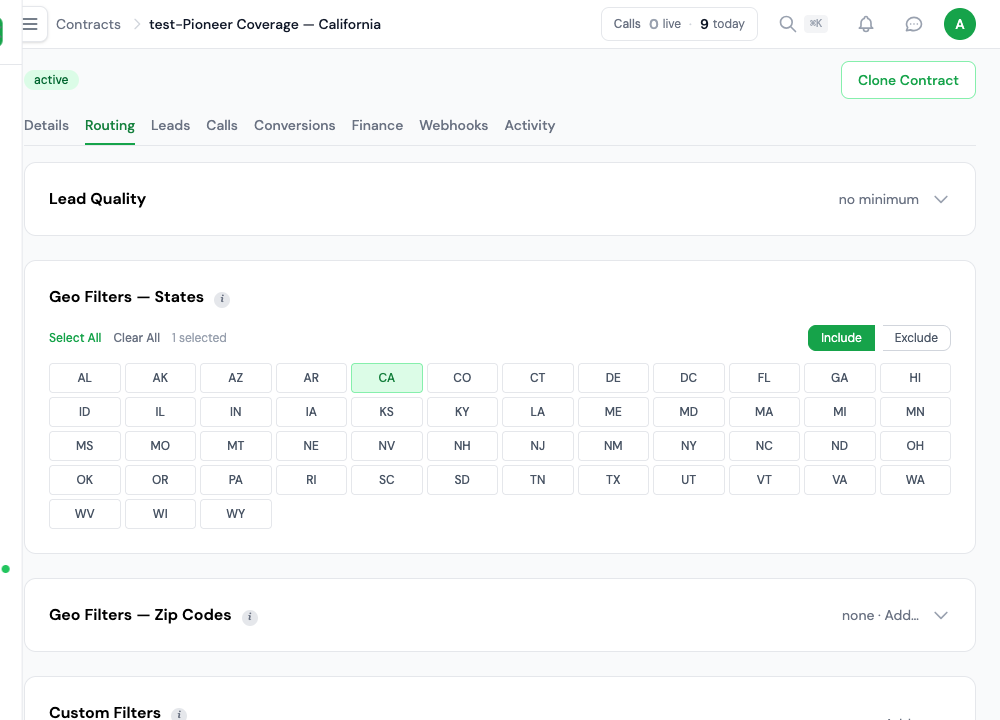
Set the allowed states and zip codes on each contract. For a buyer who covers 32 states, add those 32 states to the list. Lead Router checks that list before asking the buyer to bid.
Multi-carrier distribution: exclusive, multisell, hybrid
Choose one buyer (exclusive), several buyers (multisell), or up to a set number of buyers (hybrid). Then choose how to rank them, such as by price or priority. These choices work across insurance product types.
Daily, weekly, and monthly caps per carrier
Set a daily, weekly or monthly limit on lead count or spend for each contract. Lead Router checks the limits on each routing attempt. When a buyer has no room left, the engine moves to the next match.
Calling windows enforced per contract
Every contract has its own schedule: a time zone plus days of the week and hours. The routing engine skips any contract outside its window, so calls and live transfers only reach carriers whose window is open. You set each schedule to the calling hours your TCPA policy allows. Where rules differ, split contracts by state or product.
Secure handling for health and Medicare data
Sensitive data is encrypted with AES-256-GCM. Personal details use separate IDs, and each account’s data stays separate. Access to sensitive fields is logged. User roles control who can see health-related lead data.
Inside the contract
Make territory and capacity explicit
- Configure each agency’s territory
- Set the contract’s state filters to the territory your team has verified.
- Keep capacity under control
- Daily limits and other cap rules live on the contract. When a buyer is full, you do not need to update a spreadsheet.
Coverage
Insurance sub-verticals Lead Router handles
The same engine runs every insurance product line. Filters, caps, and schedules are set on each contract.
- Auto. Multisell to three to five carriers. Prior-insurance, vehicle-count, driving-history filters. Zip-level territory rules.
- Home. Home value, year built, roof age, prior-claims filters. Wind and wildfire zip exclusions. Often bundled with auto.
- Life (term, whole, final expense). Age-band (18 to 85), health-band, face-amount filters. Exclusive or hybrid distribution. Final expense skews age 50-plus.
- Health, Medicare Supplement, Medicare Advantage. Age-65 qualifying, household-income, effective-date filters. Sensitive fields encrypted and access-logged.
- Dental. Age and household-size filters, state plan availability. Usually multisell.
- Workers comp and commercial. SIC/NAICS, employee-count, payroll-band filters. Exclusive distribution to specialty brokers.
Integration
How Lead Router connects to insurance carriers
Set up delivery for each carrier’s lead system.
Send leads through HTTP POST, a webhook, email or Google Sheets. Lead Router supports JSON and XML. Map each buyer’s fields to rename or format the data they receive. Your team sets up and tests the connection before using it.
TrustedForm and Jornaya. Certificate URLs are accepted as custom fields at submission and sent to the buyer in the outbound POST. The buyer pulls the certificate on its own.
DNC scrubbing. At intake, your setup can send the phone number to a Do Not Call (DNC) service before accepting the lead. Rejected leads are logged with the result.
Delivery Log. Every POST to a carrier is recorded with the request, response, HTTP status, response time, and error body. Each lead and sale carries its campaign, partner, offer, contract, and buyer, so you can reconcile at the end of the month.
Frequently Asked
FAQ
The questions insurance operators ask during vendor review.
How does Lead Router preserve insurance consent evidence?
Lead Router keeps the consent proof your form sends with the lead. This can include the exact wording, time, IP address, browser and campaign. TrustedForm and Jornaya links are stored when supplied. Your team can review, export and send these records with the lead. Naming the seller in the consent language itself is the intake page's job.
Can Lead Router filter insurance leads by licensed state?
Yes. Each contract has a list of allowed states and zip codes. Add the states where the buyer can work. Lead Router checks that list before asking the buyer to bid.
How does Lead Router handle sensitive Medicare and health lead data?
Sensitive data is encrypted with AES-256-GCM. Personal details use separate IDs, and each account’s data stays separate. Access to sensitive fields is logged. User roles control who can see health-related lead data.
Can I route auto insurance leads to multiple carriers?
Yes. An offer can select one buyer (exclusive), several buyers (multisell), or up to a set buyer limit (hybrid). You can rank buyers by price, priority, weight or round robin. These rules work across insurance products.
Does Lead Router integrate with TrustedForm?
Yes. TrustedForm cert URLs are accepted as custom fields at submission and stored with the lead. The cert URL is forwarded to the buyer in the posting payload so the buyer can pull the cert independently.
Built for Insurance
One routing engine for every insurance product line
Manage buyer rules, lead limits, consent records and call hours in one place. See the plans or talk to our team about your setup.
Every feature is part of the plan. Usage is billed in credits.